
AI-Powered Translation Glossary
Your Brand. Your Terms. Every Language.
Generic translation tools butcher your brand voice. Universally’s Glossary stores your terminology and applies it on every page, in every language, every time.
Protect your brand voice across 110+ languages
Trusted by top brands


When Translation Damages Your Brand
Every inconsistency erodes trust. Every wrong term confuses customers.

Widget” Becomes 3 Different Words
Your product name changes across pages. Customers think you sell three different things.

Technical Terms Get Mangled
Industry jargon translated literally becomes meaningless, or worse, means something wrong.

Brand Voice Disappears
Your friendly, casual tone becomes stiff and corporate. Your personality gets lost in translation.
“A product name that changes from page to page tells visitors nobody checked the translation. Your multilingual site isn’t just about reach, it’s about credibility.”
Meet Your AI Translation Guardian
Universally’s Glossary stores your terms and applies your rules on every translation request, before the AI runs.
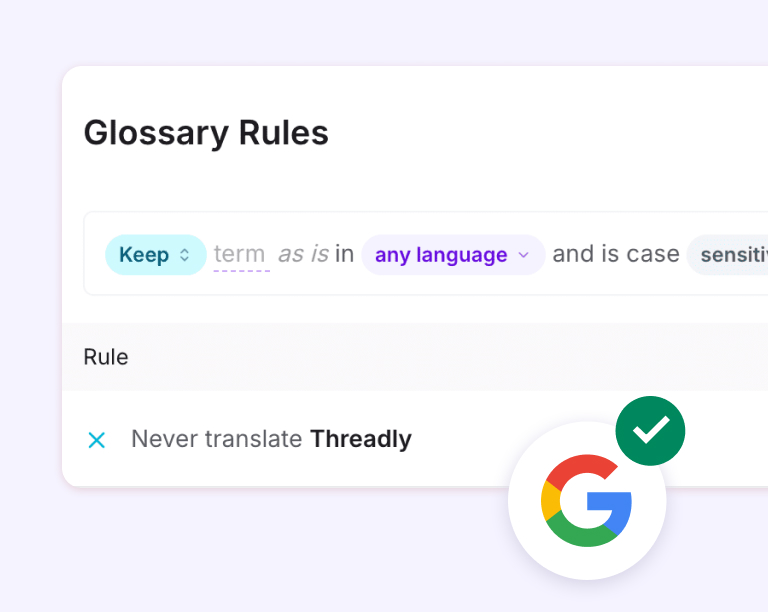
1. Add your key terms, brand names, and preferred translations
Keep a term as it is, or set its exact translation for a language

2. Choose the scope: one project or your whole workspace
A project rule overrides a workspace-wide rule

3. Every translation request checks your glossary first
Exact matches are applied directly, with no AI call
See the AI Glossary in Action
Simple terminology management. Set a rule once.

Add terms in the dashboard or through the REST API. Set the exact translation for a language, or mark a term as Keep so it stays untouched in every language.

Pattern rules cover whole families of terms. A rule like STK{n:3} keeps every product code from STK001 to STK999 intact, and numbered slots can be reordered in the translation.

Same term, different needs? Set a rule for one language or for all of them, and for one project or the whole workspace. A project rule overrides the workspace rule, so each site can have its own exception.

Search your rules, filter by Keep or Translate, and switch case sensitivity per rule. Manage everything in the dashboard or through the REST API.
Why Web Professionals Trust Universally for Global Growth
From small startups to global enterprises, WordPress, Webflow, Framer and Astro professionals trust Universally to break

Brand name
Brand Names Stay Untouched
“Nike” should be “Nike” everywhere, not translated, not transliterated, not changed. Mark any term as Keep and it stays exactly as you wrote it, in every language.
- Not Translated
- Not Transliterated
- Not Changed
Glossary Terms
Technical Terms Stay Accurate
Industry jargon isn’t in standard dictionaries. Your glossary teaches the AI your specialized vocabulary, legal terms, medical terminology, and software features, so translations are technically accurate.
- Specialized Vocabulary
- Accurate Translations
- Software Features


Rule Enforcement
Applied Before the AI Runs
When a rule matches a whole string, Universally applies it directly, with no AI call and no words spent. Inside a sentence, the AI translator receives your rules as strict instructions.
- Direct matches
- Strict AI instructions
- No words spent
Translation Knowledge
Team Knowledge, Captured Forever
When your German-speaking team member leaves, their translation knowledge doesn’t leave with them. Every rule is stored in your glossary, institutional knowledge that compounds over time.
- Translation Knowledge
- Language Control
- Decision Storage


Platform Accessibility
One Glossary, Every Platform
Your WordPress blog, Astro site, Webflow pages, Lovable app and custom web app all use the same glossary when they live in one workspace. Set a rule workspace-wide and it applies to every project; set it on one project to make an exception. No platform silos.
- Same Glossary
- Applies Everywhere
- No Inconsistency
Built for Businesses That Care About Words

Tech/SaaS
Feature names, UI strings, technical documentation
Consistent product terminology across all markets

Legal/Finance
Regulated terminology, compliance language
Approved translations for sensitive terms

Healthcare
Medical terms, drug names, safety information
Accurate clinical language that builds trust

E-commerce
Product names, category labels, size/color terms
Shopping experience that feels native

Manufacturing
Part numbers, specifications, & technical manuals
Precision terminology for technical buyers
What Terminology-Obsessed Brands Say
We needed to reach non-English audiences without doubling our content workload, and Universally delivered. The site was translated and is live across multiple languages in an afternoon, and the quality genuinely holds up. Huge win for our team.

Universally nailed the multilingual SEO piece that other tools always got wrong: clean URLs, proper meta tags, and translations that actually rank. It’s the first solution that feels built by people who truly understand WordPress.

Running a WooCommerce store in multiple languages used to mean wrestling with plugins that broke half our features. Universally just worked, product pages, checkout, everything translated cleanly. Saved us countless support headaches.

Glossary Management Compared
| Spreadsheets | Basic Translation Tools | Universally AI Glossary (Recommended) | |
|---|---|---|---|
| Keep and translate rules | |||
| Per-language rules | Limited | Any language or one language | |
| Automatic enforcement | Partial | On every translation request | |
| Shared across projects | Manual copy/paste | Platform-specific | One glossary per workspace |
| Pattern rules | — | — | Codes like STK{n:3} |

Included in Every Paid Plan
The glossary comes with every paid plan, covered by the 14-day money-back guarantee.

Support Included
If a rule does not behave the way you expect, our support team helps you get it right.

API Access
Already have a term list? Create rules from it through the REST API, or add them in the dashboard.
Your Brand Deserves Better Than Generic Translation
Every term. Every language. Consistent terminology. Start building your glossary today and protect your brand voice worldwide.

14 Days Money Back Guarantee

Read the Glossary Docs

No Credit Card Required
Frequently asked questions
Get answers to the most common questions about using Universally to create multilingual websites that actually convert international visitors.
How is this different from a basic translation memory?
Translation memory stores past translations. Universally’s Glossary enforces terminology going forward: exact matches are applied directly, and inside sentences the AI translator receives your rules as strict instructions.
Can I import my existing glossary?
Not yet. Rules are added one at a time in the dashboard, or created through the REST API if you want to script a bulk import from an existing list.
What happens if a term has multiple valid translations?
You set one rule per language, and a rule for a single project overrides the workspace-wide rule. Within one project, a term translates the same way on every page.
How many terms can I add?
Up to 500 rules per workspace on any paid plan, shared across all your projects, including up to 50 pattern rules. Each term can be up to 200 characters long.
Can different team members manage the glossary?
Yes. Owners and admins can add, edit and delete rules, editors can add and edit them, and members can view them. Permissions apply to the whole glossary, not to individual terms.