
Any Website Integration
Translate Any Website Into 110+ Languages
Universally works with any CMS, framework or static host. Choose JavaScript mode for a one-line install, or Subdomain mode for language pages that search engines can index.



How Universally Works with Any Website
Make any website multilingual in four steps.

1. Create a project
Create a project in the Universally dashboard and pick Any Website as your platform.

2. Choose a mode
Choose how translated pages are served: JavaScript or Subdomain.

3. Paste one line
Paste the one-line script tag into the head of every page. In Subdomain mode, the tag adds the language switcher.

4. Choose languages
Pick your languages. In Subdomain mode, add one CNAME record per language.
Powerful Features for Any Multilingual Website
Everything you need to translate, review and manage any website in every language.

AI Translation
Automatic AI Translation
Universally translates your pages with AI that takes the context of each string into account.
- Context-aware AI translation
- Over 110 languages
- Edit any string
Serving Modes
Two Ways to Serve Translations
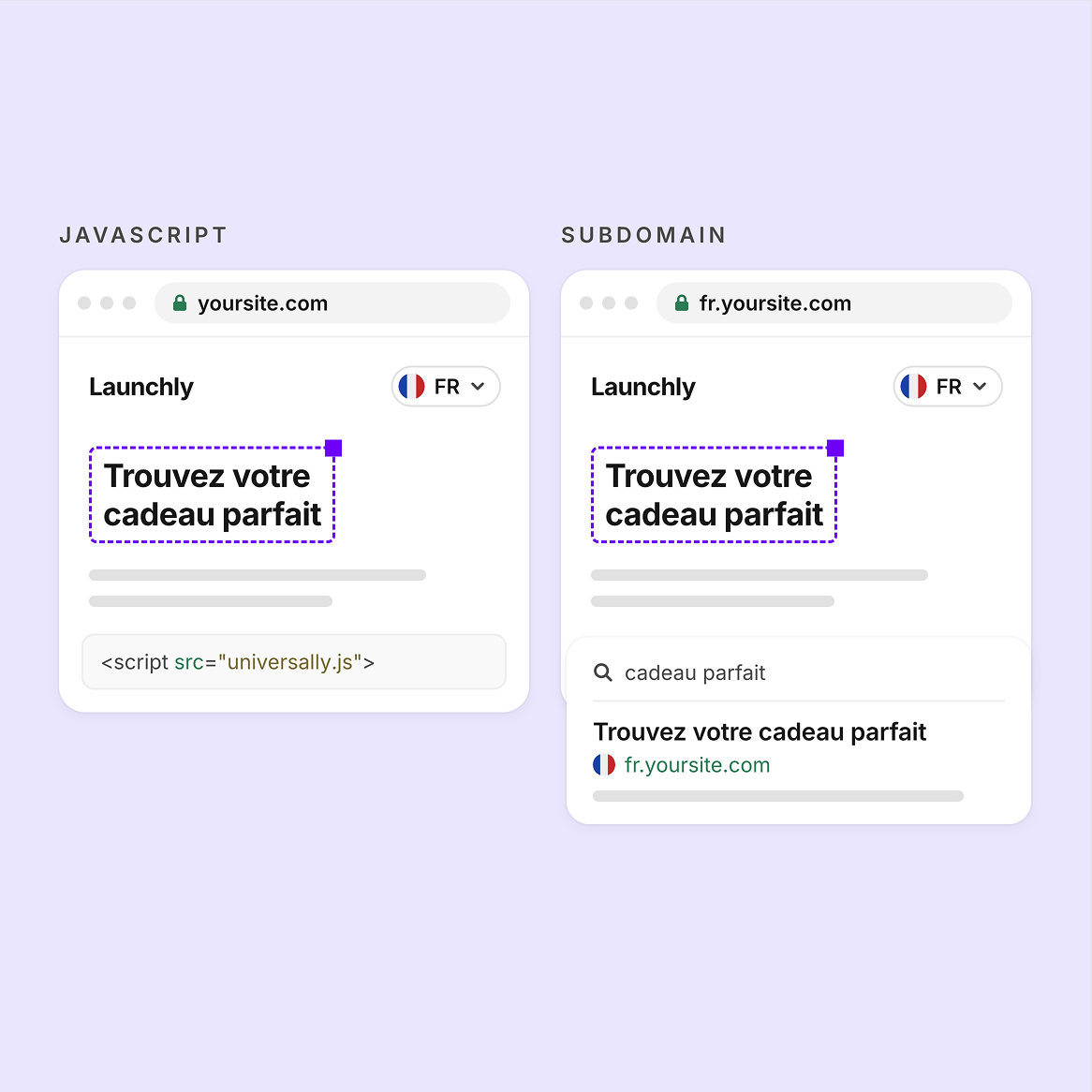
JavaScript mode is the quickest install and needs no DNS change. Subdomain mode puts each language on its own host, such as fr.yoursite.com, as a page search engines can index.
- JavaScript: no DNS change
- Subdomain: indexable pages
- Domain mode coming soon

SEO Optimization
Real Language Pages in Subdomain Mode
In Subdomain mode, every language page is a real page on its own host that search engines can index. Universally rewrites links, canonical URLs and Open Graph URLs to the language host.
- One host per language
- Canonical URLs rewritten
- Open Graph URLs rewritten
Content Synchronization
Translations Stay in Sync
When you edit your content, Universally detects the new or changed strings and translates them automatically.
- Detects changed strings
- Translates new content
- No manual retranslation


Visual Editor
Edit Translations Visually
The Visual Editor shows a live preview of your site, so you can fix a translation where it appears on the page.
- Live site preview
- Edit on the page
- No spreadsheets
Reliability
Your Original Page Always Loads
Subdomain mode fails open: if anything goes wrong, visitors get your original page. Images, CSS and JavaScript pass through untouched.
- Fails open on errors
- Assets pass through untouched
- No change until launch

Latest tips and tricks
Stay ahead with translation insights, multilingual strategies and localization tutorials for any website, whatever it runs on.
Ready to Make Your Website Multilingual?
Translate any website, choose how each language is served and reach global audiences with Universally’s fast and easy translation platform.

14 Days Money Back Guarantee

No Credit Card Required

Cancel Anytime
Frequently asked questions
Get answers to the most common questions about using Universally to create multilingual websites that actually convert international visitors.
What is the difference between JavaScript mode and Subdomain mode?
JavaScript mode is the quickest to install, needs no DNS change and works on any platform. It has no search-engine visibility and covers public pages only, because translations are applied in the visitor’s browser and the URL stays the same.
Subdomain mode is safe and quick. It never touches your live traffic and works on any registrar. Each language lives on its own host, such as fr.yoursite.com, and search engines can index those pages.
Which DNS records do I add for Subdomain mode?
You add one CNAME record for each language host, such as fr.yoursite.com, pointing at proxy.universally.app. You also add the ownership and SSL validation records the dashboard shows you.
The dashboard tracks each host through four stages: record detected, Domain verified, SSL issued and Live. Nothing changes on your live site until you turn a language on.
What happens if something goes wrong in Subdomain mode?
Visitors get your original page. Subdomain mode fails open, so on any error Universally serves the original instead of the translation.
Do I still need the script tag in Subdomain mode?
Yes. Both modes use the same one-line tag in the head of every page: <script src="https://scripts.universally.com/p/{publicKey}/s.js" async></script> In Subdomain mode, the tag provides the language switcher.
How accurate is the AI translation?
The AI is context-aware, so each string is translated with the text around it in mind. You can correct any translated string of your website in the dashboard, and the AI-powered Glossary and Translation Rules lock in brand names and industry terms so they come out the same on every page.
Can I choose specific parts of my website to translate or ignore?
Yes. In the dashboard you include or exclude parts of a page with CSS selectors. Use it to keep brand names, code samples or customer reviews in the original language while the rest of the page is translated.
Can I exclude entire pages from being translated?
Yes. Exclude a page by its URL in the dashboard and it stays in your original language. This suits legal pages or pages meant for one region only.
Can I temporarily disable a language without losing my translations?
Yes. Toggle the language off and it disappears from your site and the language switcher. Your saved translations and rules stay in place, so you can turn the language back on when you are ready.