
Astro Integration (beta)
Translate Your Astro Website Into 110+ Languages
The Universally Astro SDK translates your site from inside your code. One page tree serves every language under its own URL on your own domain.



How Universally Works with Astro
Add translations to your Astro project in four steps.

1. Install the package
Run npm install @universally-sdk/astro in your project. pnpm, yarn and bun work too.

2. Add your API key
Add UNIVERSALLY_API_KEY to your .env file. Keep it on the server and never in client code.

3. Add the integration
Add universally() to the integrations in astro.config.mjs and set your site URL.

4. Translate your pages
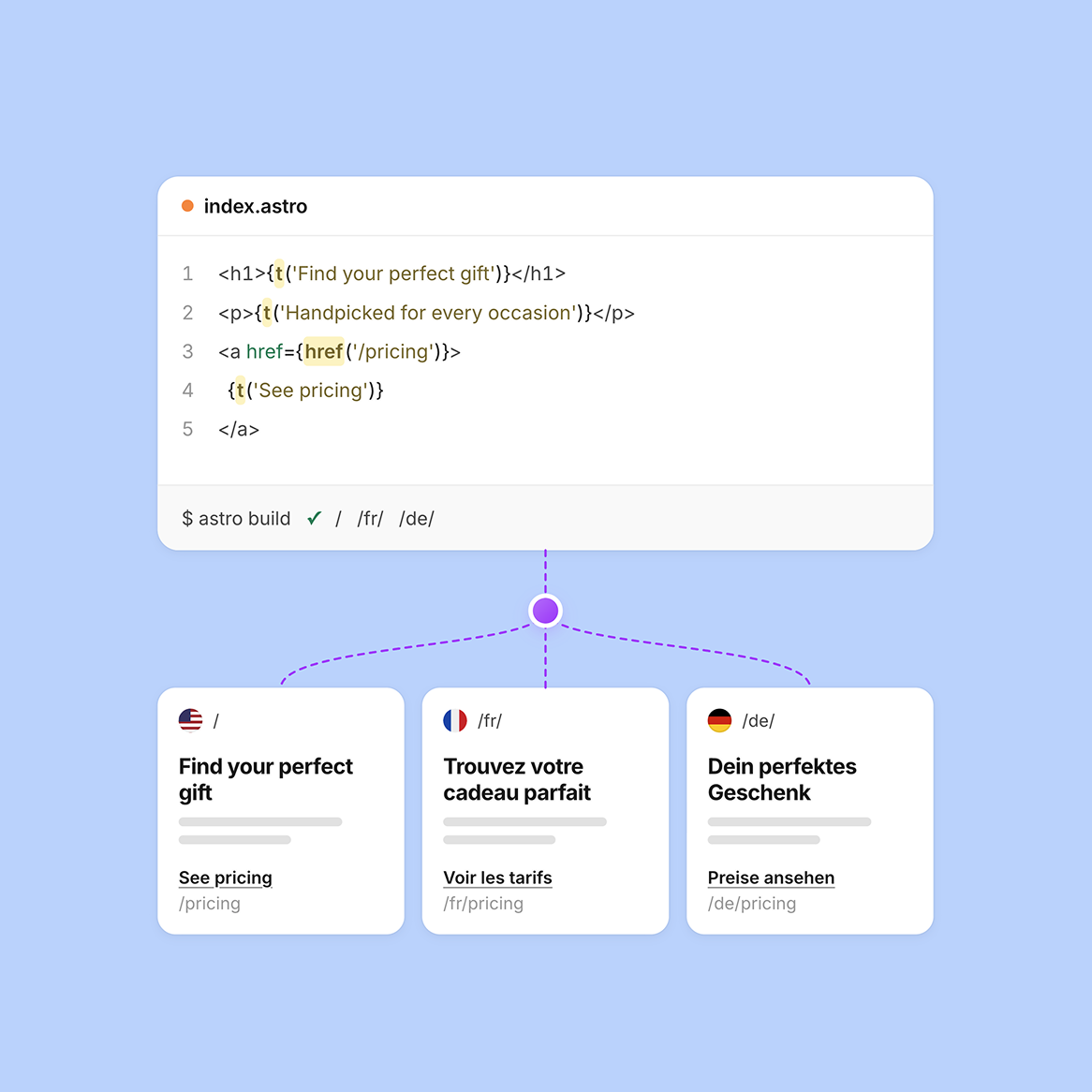
Use t() for strings and href() for links, and add <UniversallyHead /> to your layout. Each language is served at /<lang>/.
Powerful Features for Multilingual Astro Websites
Everything you need to ship your Astro site in every language, from the same codebase.

AI Translation
Automatic AI Translation
Every string you pass to t() is translated by AI that takes its context into account.
- Context-aware AI translation
- Over 110 languages
- Edit strings in the dashboard
SEO Optimization
A Real URL for Every Language
Each language is served under its own /{lang}/ prefix on your own domain. <UniversallyHead /> adds one hreflang link per language plus x-default, so search engines can find every version.
- Language URLs like /fr/
- Hreflang for every language
- x-default included

Developer SDK
Built for Astro Developers
The SDK plugs into Astro as an integration. You wrap strings in t() and links in href(), and Astro renders each language from the same page tree.
- Astro 5 and later
- SSR and static builds
- MIT-licensed package
Content Synchronization
New Strings Get Translated Automatically
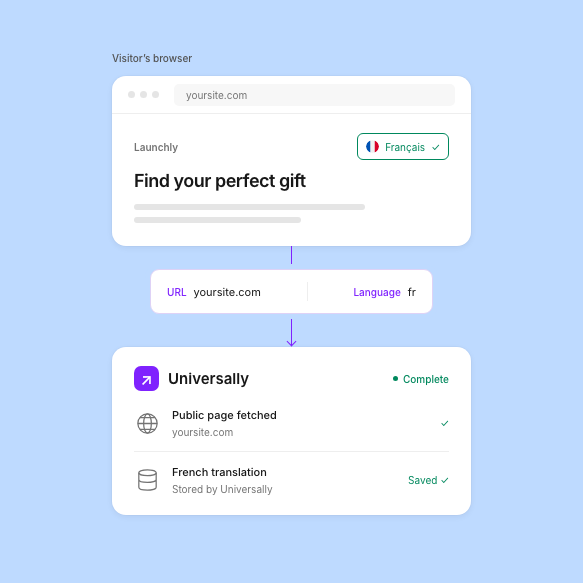
When you add or change a string, the SDK reports it after the response is sent and Universally translates it. Until the translation is ready, the page shows the source text.
- Missing strings reported
- Translated automatically
- No manual retranslation


Performance
No Visitor Waits on a Translation
t() is a synchronous in-memory lookup, so pages render without waiting on a translation request. Dashboard edits reach a running server by polling or by a signed push.
- In-memory string lookups
- No translation wait
- Edits by polling or push
Security
Your API Key Stays on the Server
The SDK reads UNIVERSALLY_API_KEY from your .env file on the server, so the key never ships to the browser. Pushes from the dashboard to your site are signed.
- Server-side API key
- Signed revalidation push
- Open-source MIT code
Latest tips and tricks
Stay ahead with translation insights, multilingual strategies and Astro localization tutorials to grow globally.


Ready to Make Your Astro Website Multilingual?
Translate your Astro website, serve every language on its own URL and reach global audiences with Universally’s fast and easy translation platform.

14 Days Money Back Guarantee

No Credit Card Required

Cancel Anytime
Frequently asked questions
Get answers to the most common questions about using Universally to create multilingual websites that actually convert international visitors.
Which Astro versions and output modes are supported?
The SDK needs Astro 5 or later. It works with server rendering, which needs an Astro adapter such as @astrojs/node, and with static builds.
In a static build, translation happens at build time. When the build finds strings without a translation, it logs how many new strings were translated and asks you to rebuild to include them.
What does the setup look like in code?
You import universally from @universally-sdk/astro and add universally() to the integrations list in astro.config.mjs. You also set the site option to your production URL and put UNIVERSALLY_API_KEY in your .env file.
In your pages, wrap text in t() and internal links in href(), and place <UniversallyHead /> in the head of your layout.
Will Universally slow down my Astro site?
No. t() is a synchronous lookup in memory, so no visitor waits on a translation request. Strings without a translation are reported after the response is sent, and the first render shows the source text.
How does the SDK handle multilingual SEO?
Each language gets its own /{lang}/ URL prefix on your own domain. <UniversallyHead /> adds one <link rel="alternate" hreflang> per language plus x-default. URL slugs themselves are not translated.
How do edits from the dashboard reach my site?
A running server polls for changes, every 60 seconds by default. You can also send a signed push to /_universally/revalidate so edits show up right away.
A newly added language is the exception: it needs a server restart or a rebuild before it appears on your site.
Can I use t() inside client-side islands?
Not yet. t() runs on the server, so translate the strings in the Astro component and pass them to the island as props.
How accurate is the AI translation?
The AI is context-aware, so each string is translated with the text around it in mind. You can edit any string in the dashboard, and the AI-powered Glossary and Translation Rules lock in brand names and industry terms.
Can I use the SDK with Universally language subdomains?
Yes. Set universally({ mode: 'proxy' }) when your languages are served on Universally language subdomains. In proxy mode the package only adds the hreflang links and the language switcher.