HubSpot Integration
Translate Your HubSpot Website Into 110+ Languages
Paste one line of code into your HubSpot website and Universally translates your website pages, landing pages and blog with AI. There is no DNS change and no plugin, and your URLs stay the same.



Built for Marketing Teams on HubSpot
Run your website and campaigns in every market, without rebuilding pages for each language.
Landing pages for every market
Launch campaign pages in new languages without cloning or rebuilding them.
Your blog, read worldwide
New posts are translated automatically, so your content reaches readers in their own language.
No extra work for your team
Keep building in HubSpot as you do now. Universally handles the translations.
How Universally Works with HubSpot
Make your HubSpot website multilingual in four steps.

1. Create a project
Create a project in the Universally dashboard and pick HubSpot as your platform.

2. Paste one line
Copy the script tag from the dashboard and paste it into your HubSpot site header HTML, in your website settings.

3. Publish and check
Publish your changes, then press Check connection. Universally loads your home page and confirms the tag is there.

4. Choose languages
Pick your languages. Translations go live and the language switcher appears on your site.
Powerful Features for Multilingual HubSpot Websites
Everything you need to translate, review and manage your HubSpot website in every language.

AI Translation
Automatic AI Translation
Universally translates your HubSpot pages with AI that takes the context of each string into account, so your messaging lands in every language.
- Context-aware AI translation
- Over 110 languages
- Edit any string
Content Synchronization
Translations Stay in Sync
When you publish a new page, landing page or blog post in HubSpot, Universally detects the new or changed strings and translates them automatically.
- Detects changed strings
- Translates new content
- No manual retranslation


Visual Editor
Edit Translations Visually
The Visual Editor shows a live preview of your site, so you can fine-tune a headline or call to action exactly where it appears on the page.
- Live site preview
- Edit on the page
- Built-in language switcher
Privacy
Only the URL Leaves the Browser
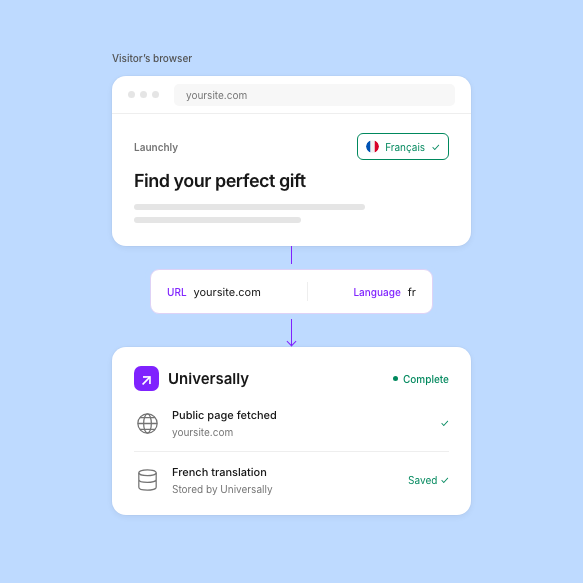
The script sends Universally the page URL and the target language, never the page content. Universally fetches the public page itself and stores translations on its own infrastructure, not in your HubSpot account.
- No page content sent
- Public pages only
- Stored by Universally