
Your account is separate from the workspaces you belong to. Your name, email, avatar, and theme follow you everywhere, while your role and projects belong to each workspace.
Edit your profile
- Open the user menu in the top bar and choose Account Settings.
- On Profile, edit First Name, Last Name, or Email Address under Personal Information.
- Save. Name changes take effect straight away.
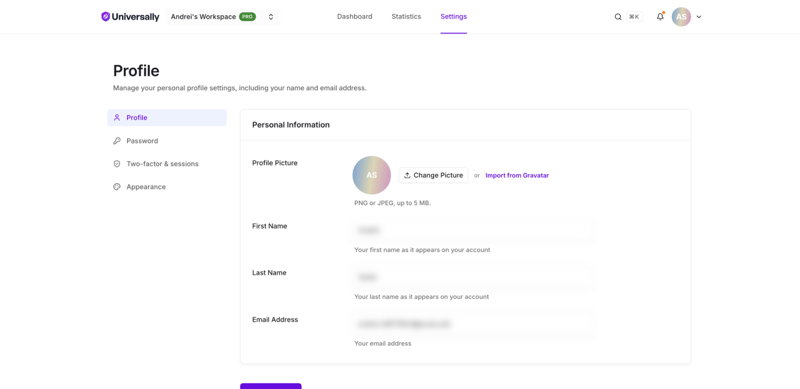
Your email address is also your sign-in identifier, so changing it changes how you sign in. It has to be an address not already used by another account.
Change your email address
Because the address is how you sign in and how you recover your password, a new one has to be confirmed before it takes effect.
- On Profile, enter the new address in Email Address and save.
- We send a 6-digit code to the new address. Open that inbox and enter the code in the dialog that appears.
- Once the code is accepted, the new address is live and you use it to sign in from then on.
The code expires after 10 minutes, and you can ask for a new one every minute. Until you enter it, nothing changes: closing the dialog leaves your old address in place, so you can start again whenever you like. If you cannot find the code, check your spam folder before requesting another.
We also send a short notice to your previous address telling you the change happened. If that notice arrives and you did not make the change, contact support right away.
Your avatar
On the same Profile screen, use Change Picture to upload a PNG or JPEG up to 5 MB. Anything else is rejected, including a HEIC photo straight from a phone. If your email address has a Gravatar, Import from Gravatar brings it across.
Avatars are shown next to your name in member lists, so a recognisable one helps on shared workspaces.
Theme
Appearance offers Light, Dark, Soft dark, and Sync with system.
What lives elsewhere
| Setting | Where |
|---|---|
| Password | Password. See Change your password |
| Two-factor authentication | Two-factor & sessions. See Two-factor authentication |
| Active sessions and trusted devices | Two-factor & sessions. See Active sessions |
| Your role, projects, and billing | the workspace, not your account. See Workspaces |