
Bad output usually has a cause you can fix, and it is worth finding which one before editing strings by hand. Work down this list: the first two explain most cases, and both are settings rather than translation quality.
Check the source language first
A project has a source language, and it tells the translator what it is reading. Set it wrong and every translation is produced from a wrong assumption, which is the single most common reason output looks nonsensical rather than merely clumsy.
The symptom is distinctive: translations read as though the original had been misheard, or a language comes back barely changed from the source. If you see that across the whole site rather than in a few strings, check the source language before anything else.
It is set when the project is created, and shown next to the project name in the sidebar as Default. It is changed under General Settings, where it is labelled Source Language.
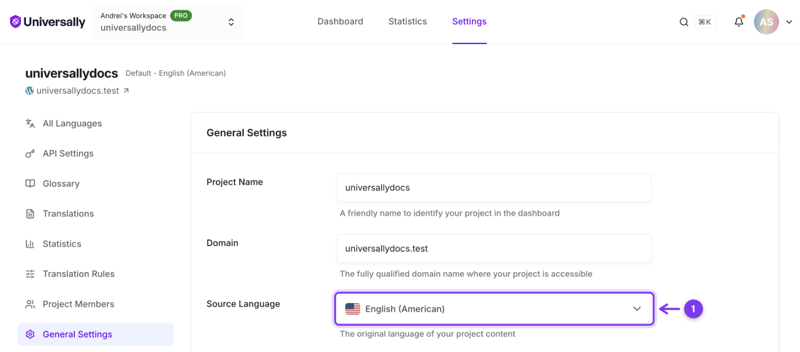
Correcting it means retranslating the affected strings, since the existing ones were produced from the wrong starting point.
Then check the variant
Spanish for Spain and Spanish for Latin America are not the same target, and neither are Portuguese for Portugal and for Brazil. A translation that native speakers describe as "correct but foreign" is often the wrong regional variant rather than a quality problem. See Language variants and regional targeting.
Terms that should not have been translated
Brand names, product names and technical terms come back translated when nothing told the translator to leave them alone. A glossary rule fixes this everywhere at once, including in text translated later, which is better than editing each occurrence. See Keep a term untranslated.
Short strings with no context
"Home", "Apply", "Post", "Order" are ambiguous in isolation, and a button label is exactly that. The translator sees the string, not the page around it. These are worth correcting by hand, since there is no context to add. See Edit translations manually.
Text that reads oddly rather than wrongly
Machine translation renders your wording faithfully. It does not re-pitch a sentence for a different market, so marketing copy tuned for one audience can land flat in another even when the translation is accurate. That is a copywriting job: edit the string, and it stays edited through later retranslations.
Half-translated pages
If part of a page is in the wrong language rather than badly translated, it is not a quality problem at all. Content that arrives after load is not translated, and excluded regions are left alone deliberately. See Translate dynamic and JavaScript content and Translations are not appearing.
Fixing what you find
One string: edit it, from the Translations screen or by clicking it on the page in the Visual Editor. Normal page translation never touches a string that already has a translation, so your wording stays. Choosing Retranslate with AI on that row does replace it: use History on the row to get your version back.
One term, everywhere: a glossary rule.
A whole language: check source language and variant before concluding the quality is poor.
After a glossary change: a rule that matches a whole string (a button label, a brand name on its own) applies on the next page load by itself. For a term inside a longer sentence, the stored translation is unchanged, so use Retranslate with AI on the strings that matter. Clearing the cache does not apply a glossary change: the same stored translation is served again. See How rules are applied.