
Every language gets its own URL, and on WordPress and with the Astro SDK that URL is a subdirectory: example.com/es/pricing/. Language subdomains such as es.example.com are available for Any Website projects and for Astro in the Subdomain serving mode; see Language subdomains.
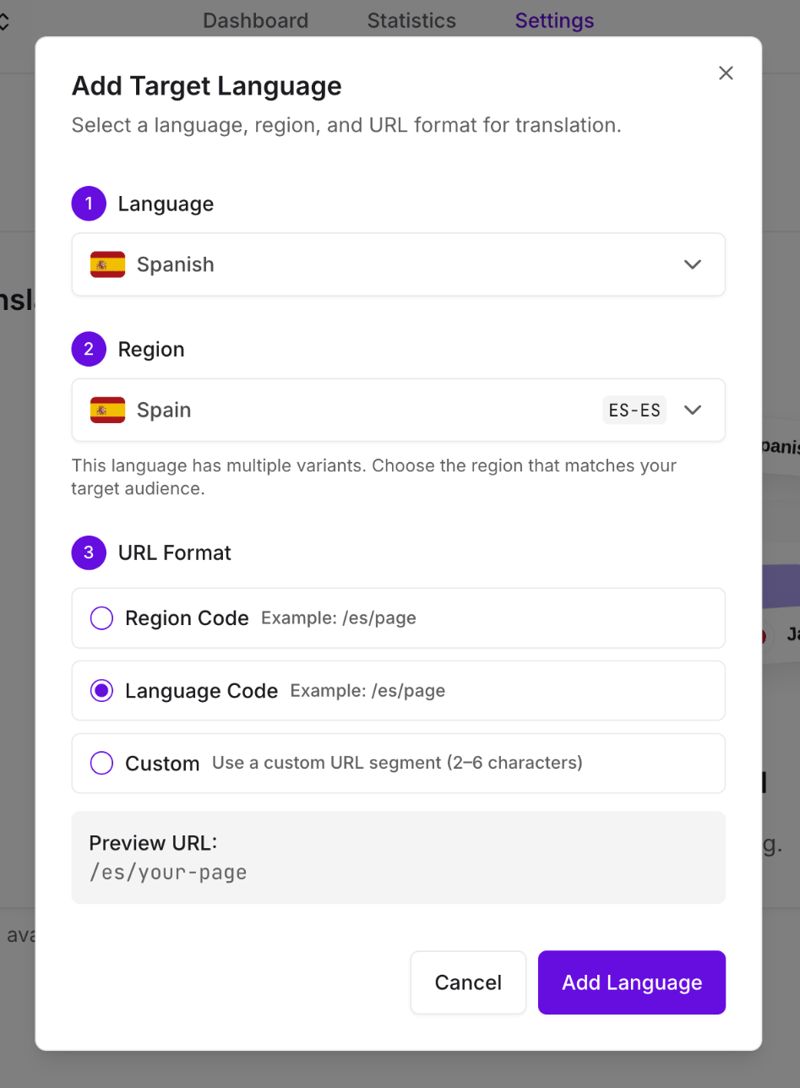
What you choose per language
The URL structure is fixed for a project. What you pick for each language is the segment that identifies it, under URL Format, and it takes three forms:
- The language code, so Spanish becomes
/es/. The usual choice. - The region code, so Spanish (Mexico) becomes
/mx/. Useful when you are targeting countries rather than languages, and clearer to visitors who think in markets. - A custom segment of 2 to 6 characters, when neither code reads the way you want.
Each segment has to be unique within the project, and it applies to every path uniformly. It can be changed later from the language's row on the All Languages screen. See Add and remove languages.
Why subdirectories
Worth knowing, because it is the one most sites should want:
- Nothing to configure. No DNS records, no certificates, no per-language hosts.
- Every language contributes to one domain's authority instead of splitting it across hosts.
- Each language is still a real, separately indexable URL, which is what search engines need.
What does not change
Your slugs stay in the source language. /es/pricing/ is Spanish at /pricing/, not /es/precios/. The language segment is added; the rest of the path is passed through exactly as it was. If a translated slug matters to you, that is not something Universally does.
Your existing URLs keep working. Adding a language does not move or rewrite anything that was already published. See Existing URLs and redirects.
Language subdomains
Serving each language on its own hostname, such as es.example.com, is available for Any Website and Astro projects, and not for WordPress or the website builders yet. A JavaScript mode project can move to subdomains from its Setup page, and moving back is not available. Each language hostname needs three DNS records: one routes the subdomain, one proves you own the domain, and one lets the certificate be issued. See Language subdomains.