
You can sign up with Google, or with an email address and password. Either way no payment details are required at any point. Go to app.universally.com/register, or choose Sign up from the login page.
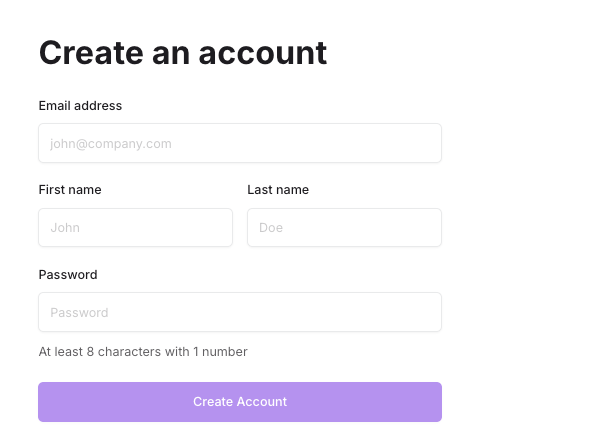
Four fields:
- Email address, which is also how you log in
- First name and Last name
- Password, at least 8 characters including 1 number
Then choose Create Account.
Or sign up with Google
Sign up with Google on the same page skips the form. You are sent to Google, and back with an account already created and signed in. On the login page the same button reads Continue with Google.
Two things worth knowing:
It joins up with an existing account. If you already have a Universally account on that email address, signing in with Google gives you that same account rather than making a second one. Your projects, workspaces and translations are all where you left them, and you can use either method to sign in from then on.
Your Google email has to be verified at Google. An unverified Google address is refused, because the email address is what identifies the account.
A Google-only account has no password. Nothing breaks, but two things in the dashboard ask for one, so see Change your password for how to add one if you want it.
What comes next
Two screens before you reach your first project, and neither one charges you.
Choose your plan. Signing up takes you to a plan screen with a monthly and yearly toggle, running from Free upwards. Free is a real option here, not a trial: pick it and carry on.
Add a card, or skip it. Whichever plan you chose, the next screen asks for a card. On Free it is offered so that translation can continue if you run out of words rather than stopping. You do not have to give one: Skip and Connect goes on without it, and the dialog that asks whether you are sure is a confirmation, not a wall. Nothing is charged at signup either way. See Usage limits for what a card on file changes.
Create your project. An account on its own translates nothing: a project is what holds a site, its languages and its translations. See Your first translation for the walkthrough, and Projects, workspaces and sites for how the pieces fit together.