
Translated pages are cached so they serve instantly after the first request. That is also why a change you just made can keep showing the old version: something in the chain is still holding the previous copy. There is usually more than one cache in that chain, and clearing the wrong one explains most of the confusion.
Clear Universally's cache
Open the project, choose General Settings, and use Clear translator cache under Project actions.
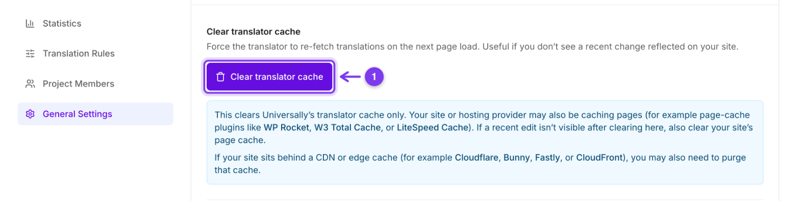
That forces the translator to fetch translations again on the next page load rather than serving what it already had. It clears a cache, not your content: stored translations stay where they are. It also covers the whole project at once, every language and every page: there is no per-language or per-page clear.
Then the caches Universally does not control
The dashboard says this on the same screen, and it is the part people miss:
Your page cache. A caching plugin such as WP Rocket, W3 Total Cache or LiteSpeed Cache stores the whole rendered page. If it holds a translated page, clearing Universally's cache changes nothing a visitor sees until you clear that too.
Your CDN or edge cache. Cloudflare, Bunny, Fastly and CloudFront each keep their own copy. Purge the URL, or the language path, after clearing the other two.
Work outwards in that order: Universally, then the page cache, then the CDN. Checking in a private window between steps tells you which layer was holding the old copy.
When you do not need any of this
You edited a translation by hand. Your version is used from the next page load.
You added a language. Its pages have never been translated, so there is nothing cached to clear.
You published a new page. It is translated the first time it is requested in each language.
You changed a glossary rule. A rule matching a whole string applies on the next page load on its own. For a term inside a longer sentence, the stored translation is unchanged and clearing the cache does not apply the rule, so use Retranslate with AI on the strings that matter. See Glossary rules.
If it still shows the old version
See Translations are not appearing, which covers the cases where nothing was cached in the first place.