
Languages are managed per project on the All Languages screen. Adding one starts translating into it; disabling one hides it without discarding anything.
Before you start
You need Owner, Admin or Editor to add a language. Only Owner or Admin can remove one.
Your plan caps how many languages a project can have. See Plans and pricing.
Add a language
- Open the project and choose All Languages.
- Choose Add Language.
- Pick the Language, then the Region, then the URL Format.
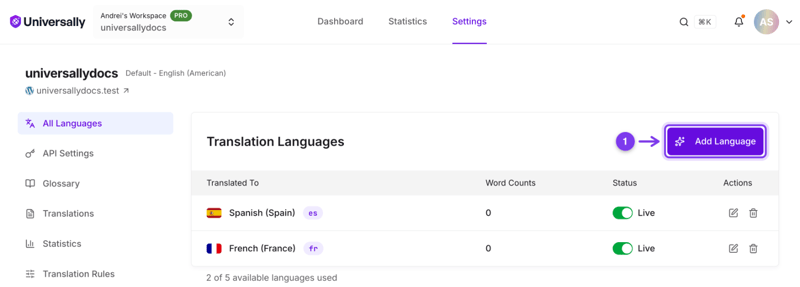
The region matters more than it looks for five languages, where it decides how the text is written rather than just which flag appears. See Language variants and regional targeting.
Translation begins on demand rather than immediately: a page is translated the first time someone requests it in the new language. Nothing is charged against your word total until then.
Edit a language
The pencil icon in the row's Actions column changes two things about a language you already added, so a wrong region or an awkward URL segment does not mean deleting and starting again. It needs the same role as adding: Owner, Admin or Editor.
Region. Only regions that share the language's variant are offered, so the text itself does not change. This is how you switch Spanish (Mexico) to Spanish (Argentina): a different flag and region code, the same translation. See Language variants and regional targeting.
URL Format. The segment in the URL: the language code, the region code, or a custom segment of 2 to 6 characters. It has to stay unique within the project.
Changing the segment changes the URLs that language is served on, so anything already linking to the old segment needs updating, and search engines will see the new URLs as new pages.
Disable a language
Toggle its Status off. The language disappears from the switcher and its URLs stop serving, but its translations are kept.
Use this to take a language off your site temporarily, or to stage one before launch. Re-enabling it brings back the translations you already had, at no further cost in words.
Remove a language
Use the delete icon in the row’s Actions column.
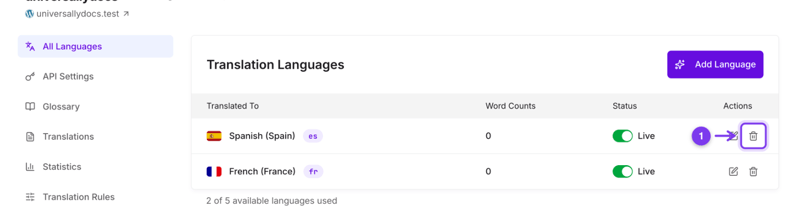
The language leaves the project's list, and its words leave your totals in the same moment. Disabling is still the tidier choice for taking a language off the site temporarily, since it changes nothing but visibility.
It is reversible. Add the same language back later and its previous translations come back with it, along with their share of the word count, at no further cost in words.
Pausing translation
There is no project-level pause. The nearest thing is the Status switch on each language row, labelled Live, turned off one language at a time. Configuration, translations and word counts all survive, so it is the right tool for taking a language off the site for a while.
What switching a language off does:
- It disappears from the language switcher and from the pickers in Translations and Glossary.
- The plugin is told it is off, so your site stops linking to it.
- Nothing is deleted and no counts change.
One limit worth knowing if your reason for pausing is to stop spending words: this is a visibility switch rather than a hard block at the edge. A request that reaches a disabled language's URL directly, from a bookmark, an external link or a crawler that already knows the URL, is still translated. If the goal is to stop translation outright, the reliable levers are excluding the pages in question, or removing the language.
The one thing that stops translation completely is running out of words, and that happens on its own: the dashboard then says translations are paused until you change plan. See Usage limits.
What removing a language does to your usage
Removing a language subtracts its words, immediately. The project's count is recalculated from the languages that remain, and the workspace count from its projects, both before the request finishes. Clear every language from every project and both figures reach zero, because the number describes what is translated now rather than everything ever translated.
Disabling does not touch either figure. A disabled language keeps its translations and its share of the count, which is the trade for being able to switch it back on instantly.
See Word counting and Usage limits.